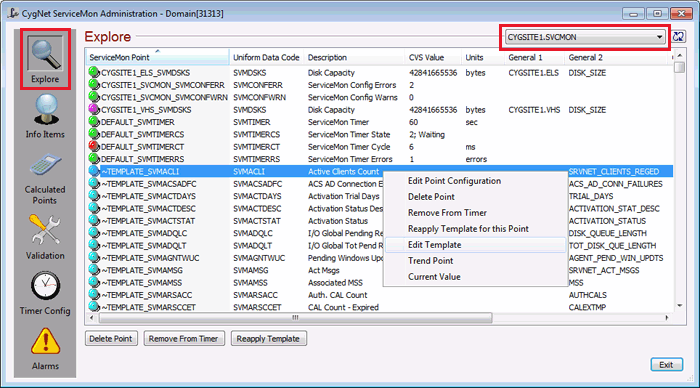
The default view in the CygNet ServiceMon Administration utility is Explore. From this view you can see all configured SVCMON points. For each point the utility displays the following properties: ServiceMon Point, Uniform Data Code, Description, CVS Value, Units, General 1, General 2, Calc Type, Timer, Timestamp, and Domain.
Select the points to which you want to modify. Press Ctrl+Click to select multiple items. You can sort or reverse sort items in a column by clicking the column heading.
Select one or more points in the Explore view and use the buttons to perform selected actions.
| Button | Description |
|---|---|
|
Delete Point |
Delete the selected points from the PNT. You also have the option to delete the point(s) from the VHS. |
|
Remove From Timer |
Unassign the selected points from the associated timer. See Associating SVCMON Points with Timers. |
|
Reapply Template |
Click to reapply a point's template configuration to a SVCMON point. See SVCMON Point Templates. |
Select a single point in the Explore view and right-click to perform selected actions.
| Item | Description |
|---|---|
|
Edit Point Configuration |
View the point configuration for the selected point. Or double-click to invoke the point configuration. |
|
Delete Point |
Same as button. |
|
Remove From Timer |
Same as button. |
|
Reapply Template for this Point |
Same as button. |
|
Edit Template |
View the template configuration for the selected point. Or double-click to invoke the template configuration. |
|
Trend Point |
View a trend for the selected point. See Trending SVCMON Point Values. |
|
Current Value |
View the current value for the CVS record on the Point Properties dialog box. |
More:

|
|
|


